-40%
FUNSHION  433Mhz DC 6V 12V 24V Universal Wireless Remote Control Switch 2 CH RF Relay Receiver Module DC5-30V For Smart Home
Zoom the image with the mouse

FUNSHION 433Mhz DC 6V 12V 24V Universal Wireless Remote Control Switch 2 CH RF Relay Receiver Module DC5-30V For Smart Home

2 sold in last 8 hours
362In stock
51050220-10-receiver-only

Brand Name: FUNSHION LAB
Use: Universal
Use: Lighting
Use: Electric Door
Use: Automated curtains
Use: SWITCH
Certification: CE
Origin: CN(Origin)
Wireless Communication: RF
Support APP:...

Please hurry, only 362 left in stock

$75.42 $44.50
Size Guide

customers are viewing this product
FUNSHION 433Mhz DC 6V 12V 24V Universal Wireless Remote Control Switch 2 CH RF Relay Receiver Module DC5-30V For Smart Home

Brand Name: FUNSHION LAB
Use: Universal
Use: Lighting
Use: Electric Door
Use: Automated curtains
Use: SWITCH
Certification: CE
Origin: CN(Origin)
Wireless Communication: RF
Support APP: No
Channel: 2
Package: Yes
Frequency: 433 MHz
Model Number: Universal Wireless 433Mhz RF Relay Remote Control Switch For Gate Door
Working Voltage: DC 5-30V (6V 10V 12V 20V 24V 30V)
Quiescent Current: 5mA
Modulation Mode: ASK
RF Working Mode: Superheterodyne
Working Mode: Momentary and Toggle
Application Example 1: Mando a Distancia Para Garage,Electronic Gate, Electrical
Application Example 2: Mando a Distancia Para Garage
Application Example 3: Learning Button Motor
Application Example 4: Heating Systems Control
Shell: Shell
working range: for garage/door/lamp/Light/LED/Fanner/motor/Signal transmission


Specifications:

Model: KR2402A-4
Product Type: 2-Channel Remote Control Switch
RF Working Mode: ASK Superheterodyne Reception
Modulation Mode:ASK
Working Mode: Momentary/Toggle/Latched, etc. 
Matching Mode: Intelligent Learning Code .
Power: Wide voltage  DC 5V-30V
Quiescent Current:5mA

RF Frequency: 433MHz
Circuit Board Size: 25 * 54 * 75mm
Operation Introduction:

About Working Mode:
1. Momentary/Joggle: Press and hold->On; Release->Off
Keep pressing one button, the corresponding channel is working /on; Release your finger is stop/OFF. (4 channel switch(receiver) need 4 button remote control (transmitter )
2. Toggle/Self-Lock: Press->On; Press again->Off    
Press one button for one time, the corresponding channel is working/on; Press the same button again to stop/OFF. (4 channel switch(receiver) need 4 button remote control (transmitter).
3. Latched/Inter-Lock: Press->on; Press other button->Off
Press one button for one time, the corresponding channel is working/on; Press another button is stop/OFF(At the same time, another corresponding channel works). (4 channel switch( receiver) need 4 buttons remote control (transmitter).

The Setting of Working Mode:
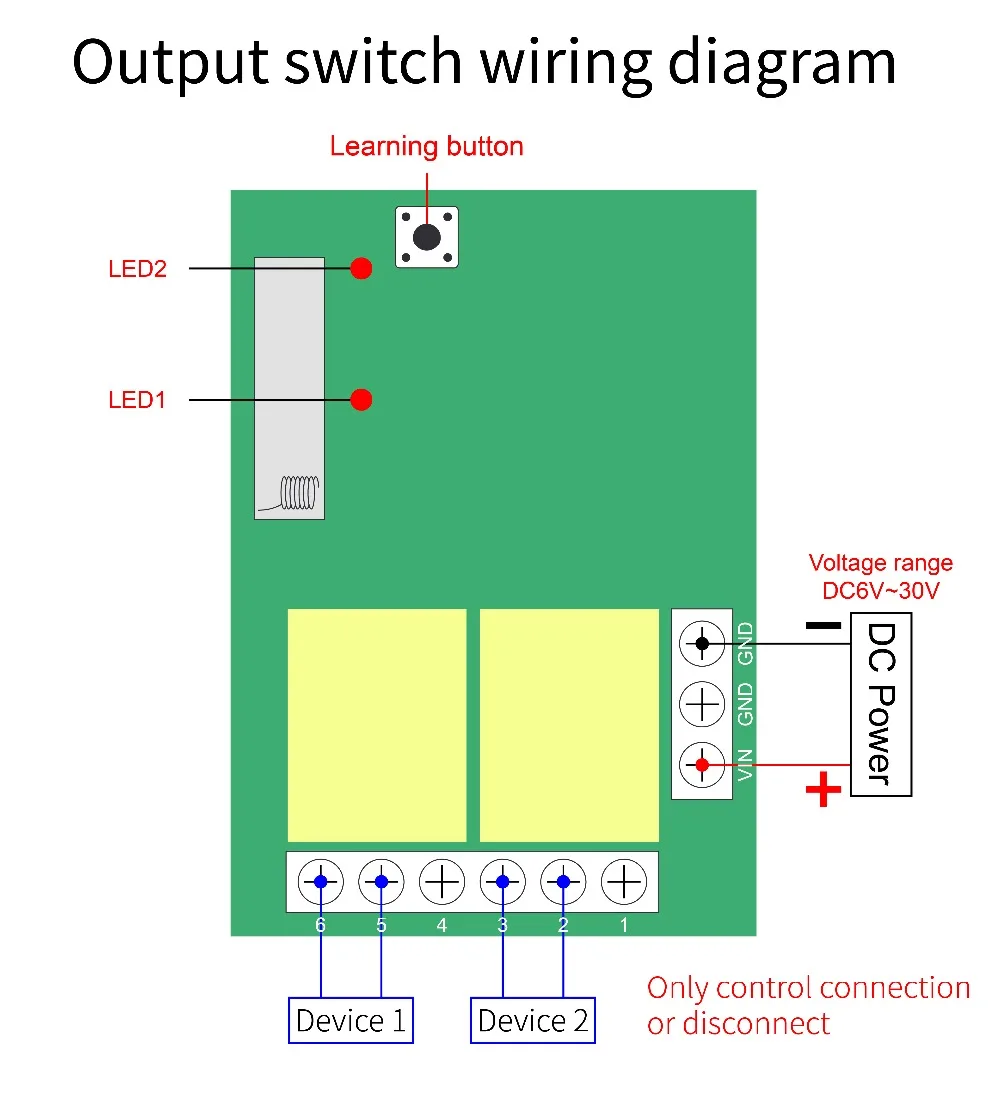
1.Momentary Mode: Pressing the learning key button on the receiver board once (LED Indicator on receiver board will signaling simultaneously), then press any of the remote button, signaling three times by remote's LED indicator means setting Momentary Mode successfully.
2. Toggle Mode: Pressing two times the learning key button on the receiver board twice(LED Indicator on receiver board will signaling simultaneously),then press any of the remote button , signaling three times by remote's LED means setting Toggle Mode successfully.
3.Latched Mode: Pressing the learning key button on the receiver board three times (LED Indicator on receiver board will signaling simultaneously), then press first remote button, follow on second remote button, signaling three times by remote's LED indicator means setting Latching Mode successfully (first button stands for on, second button stands for off ).
4.2CH Momentary 2CH Toggle: Pressing the learning key button on the receiver board four times(LED Indicator on receiver board will signaling simultaneously),then press any of the remote button , signaling three times by remote's LED indicator means setting successfully.
5. 2CH Momentary 2CH Latched: Pressing the learning key button on the receiver board five times(LED Indicator on receiver board will signaling simultaneously), then press any of the remote button, signaling three times by remote's LED indicator means setting successfully .
6. 2CH Toggle 2CH Latched: Pressing the learning key button on the receiver board six times(LED Indicator on receiver board will signaling simultaneously), then press any of the remote button, signaling three times by remote's LED indicator means setting successfully.
7. 2CH Latching 2CH Latched: Pressing the learning key button on the receiver board seven times(LED Indicator on receiver board will signaling simultaneously), then press any of the remote button, signaling three times by remote's LED indicator means setting successfully.
8. Deleting Existing Remote Controls Data: Pressing the learning key button on the receiver board eight times, the LED Indicator on receiver board will flash for eight times, it means that the existing remote controls are deleted successfully.


Read more
Read less

.

Returns Policy

You may return most new, unopened items within 30 days of delivery for a full refund. We'll also pay the return shipping costs if the return is a result of our error (you received an incorrect or defective item, etc.)...

You should expect to receive your refund within four weeks of giving your package to the return shipper, however, in many cases you will receive a refund more quickly. This time period includes the transit time for us to receive your return from the shipper (5 to 10 business days), the time it takes us to process your return once we receive it (3 to 5 business days), and the time it takes your bank to process our refund request (5 to 10 business days).

If you need to return an item, simply login to your account, view the order using the "Complete Orders" link under the My Account menu and click the Return Item(s) button. We'll notify you via e-mail of your refund once we've received and processed the returned item.

Shipping

If you need to return an item, simply login to your account, view the order using the "Complete Orders" link under the My Account menu and click the Return Item(s) button. We'll notify you via e-mail of your refund once we've received and processed the returned item.

When you place an order, we will estimate shipping and delivery dates for you based on the availability of your items and the shipping options you choose. Depending on the shipping provider you choose, shipping date estimates may appear on the shipping quotes page.

Please also note that the shipping rates for many items we sell are weight-based. The weight of any such item can be found on its detail page. To reflect the policies of the shipping companies we use, all weights will be rounded up to the next full pound.

.

Information

Lorem ipsum dolor sit amet, consectetur adipiscing elit. Morbi ut blandit risus. Donec mollis nec tellus et rutrum. Orci varius natoque penatibus et magnis dis parturient montes, nascetur ridiculus mus. Ut consequat quam a purus faucibus scelerisque. Mauris ac dui ante. Pellentesque congue porttitor tempus. Donec sodales dapibus urna sed dictum. Duis congue posuere libero, a aliquam est porta quis.

  • Comodous in tempor ullamcorper miaculis.
  • Pellentesque vitae neque mollis urna mattis laoreet.
  • Divamus sit amet purus justo.
  • Proin molestie egestas orci ac suscipit risus posuere loremous.
Sample LookBook Gallery

Curabitur semper sagittis mino de condimentum. Donec an mullamcorper mauris. Lorem ipsum dolor sit amet consectetur curabitur porttitor. Pellentesque habitant morbi tristique senectus et netus et malesuada fames ac turpis egestas. Sed efficitur vulputate turpis, a fermentum diam condimentum eget. Donec egestas ante vitae risus dignissim nec efficitur enim vulputate. Pellentesquae diam dolor an elementum et lobortis at mollis ut risus.

Sample Ordered List

  1. Comodous in tempor ullamcorper miaculis.
  2. Pellentesque vitae neque mollis urna mattis laoreet.
  3. Divamus sit amet purus justo.
  4. Proin molestie egestas orci ac suscipit risus posuere loremous.

Sample Block Quote

Praesent vestibulum congue tellus at fringilla. Curabitur vitae semper sem, eu convallis est. Cras felis nunc commodo eu convallis vitae interdum non nisl. Maecenas ac est sit amet augue pharetra convallis nec danos dui.
Sample Block Text

Praesent vestibulum congue tellus at fringilla. Curabitur vitae semper sem, eu convallis est. Cras felis nunc commodo eu convallis vitae interdum non nisl. Maecenas ac est sit amet augue pharetra convallis nec danos dui. Cras suscipit quam et turpis eleifend vitae malesuada magna congue. Damus id ullamcorper neque. Sed vitae mi a mi pretium aliquet ac sed elit. Pellentesque nulla eros accumsan quis justo at tincidunt lobortis denimes loremous. Suspendisse vestibulum lectus in lectus volutpat, ut dapibus purus pulvinar.

Customer Reviews

Real Reviews from Real Customers

×

Someone recently bought a

This website uses cookies to ensure you get the best experience. Learn more
Ok, Got It

Your cart

×